Creating Candidate Keys for Coordinates
Mapdata allows a single variable to be used to group data when aggregating data, plotting data, and creating some types of statistical summaries. Geographic coordinates are specified by two variables–latitude and longitude. Therefore data can be grouped by location only if there is a unique identifier in the data set for each unique combination of latitude and longitude values.
If the data set does not inherently contain a column with a unique identifier for each set of geographic coordinates, this tool, available from the Table/Add coordinate key menu, will create such a column. The new column will be populated with numeric values, optionally preceded by other text.
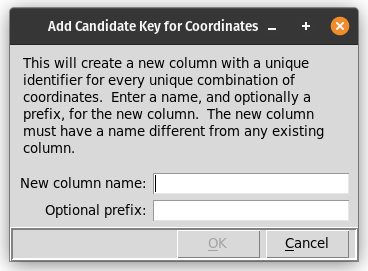
This dialog prompts for:
A name for the new column that will contain location identifiers.
An optional prefix to use before the numeric identifiers that are created. If a prefix is specified, it will be separated from the numeric part of the identifier with an underscore.
After this information has been entered and the “OK” button selected, the new identifiers will be created and the new column added to the data table.
The data table produced by the Table/Counts by location menu item will include this new column following the column with the number of data rows for each unique set of geographic coordinates.