Testing Cardinality
This tool evaluates the cardinality of the relationship between one or more key columns and one or more attribute columns. This can assist in determining how a large table can be factored into multiple relational tables.
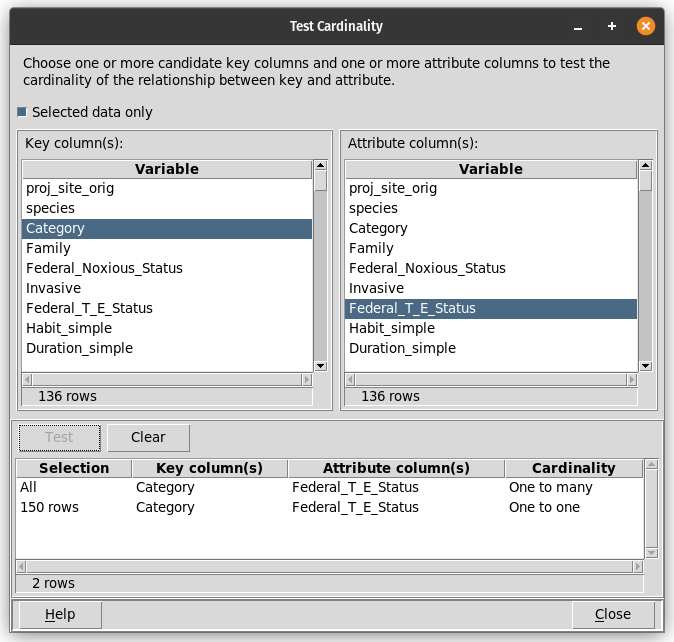
One or more key columns must be selected from the list at the left, and one or more attribute columns must be selected from the list at the right. Shift-click and Control-click can be used to select multiple columns. The key columns may be those that are presumed to make up a candidate key for a relational table containing a subset of the columns in the overall data table. The attribute columns may be one or more of the non-key columns presumed to be included in that relational table.
When the “Test” button is clicked, mapdata will evaluate whether the data table contains multiple values of the selected attribute(s) for any value of the key column(s). If there are multiple values, the cardinality will be reported as “One to many”. If there is only one value of the attribute(s) for each key, the relationship will be reported as “One to one”.
If any column is specified to be both a key and an attribute, it will be treated as a key column and not evaluated as an attribute.
The results of each test will be summarized in the table at the bottom of the dialog. The first column, “Selection”, will contain “All” if the evaluation has been performed using all rows of the data table, otherwise it will show the number of rows in the subset that was used. The table of results can be saved to a file with the Ctrl-S hotkey, or cleared using the “Clear” button. If evaluations were carried out using a subset of data rows, that subset can be identified by exporting the selected rows (using the Table/Export selected menu item) when the cardinality testing results are saved.
The unique values tool may be useful in conjunction with this cardinality testing tool when evaluating whether the data table can be factored into several relational tables.