Displaying Numbers of Missing Values By Variable
This tool displays a table showing the numbers of missing values in selected variables. The evaluation can be carried out either for all data or for a selected subset of rows, and can be carried out separately for different values of a grouping variable.
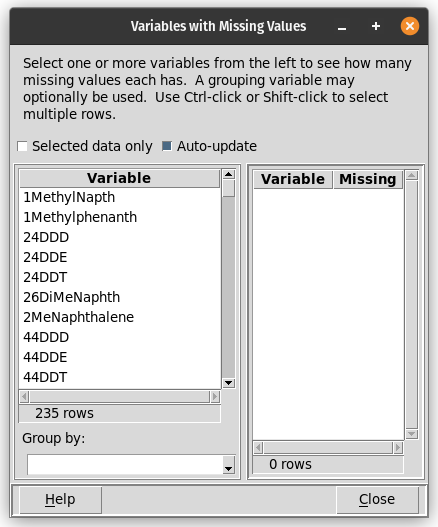
One or more variables must be selected from the list at the left. Shift-click and Control-click can be used to select multiple variables. The checkbox above the list of variables controls whether all rows in the data table, or just the selected rows (if any) are evaluated. Below the list of variables, a drop-down box allows a grouping variable to be selected.
The output may be in either of two forms, depending on whether or not a grouping variable is selected. If no grouping variable is used, the output will have two columns, the first containing the variable names and the second containing the number of missing values for the corresponding variable. If a grouping variable is used, the output table will have one row for each value of the grouping variable, and one column for each of the variables to be assessed; each cell of the table will contain the number of missing values for that group and variable.
Numbers of missing values are automatically recalculated whenever any data selection is changed.
The table of missing values can be saved with the Ctrl-S hotkey.
Missing values can also be summarized by row, and rows of the main data table can be selected using the Select non-missing dialog.